Product overview
One workspace for the decisions behind the firm.
Norma connects the firm data you already produce to the decisions that shape margin, cash flow, workload, scope control, pricing discipline, and long-term firm value.
01
Fees & pricing
What should we charge?
The fee decision runs on a full stack of engines, each with a fixed method you can open. Three ways to price a project, one verdict, and a memo that holds it.
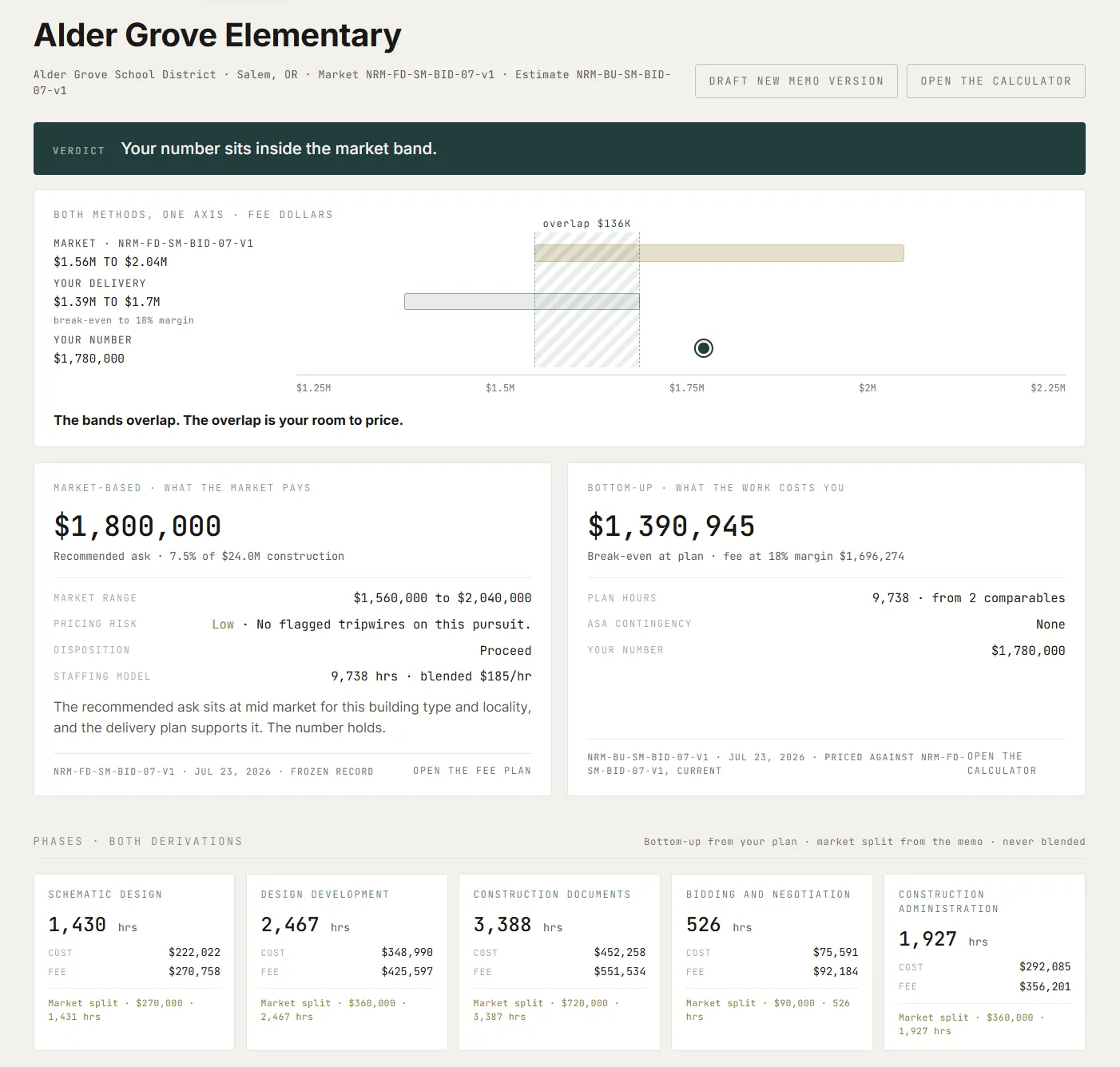
The market band and the firm's own delivery cost on one axis, the committed fee inside their overlap, the verdict computed live.
-
Market fee engine
Prices a project against the market: rate, hours, and construction-cost methods, each with its inputs shown.
-
Bottom-up cost
Builds the fee floor from the firm’s own loaded rates and hour budgets, phase by phase.
-
Comparable estimation
Reads the firm’s completed projects and returns the range they actually support, outliers flagged.
-
Triangulation
Puts the three methods side by side and renders a verdict, computed fresh at every view, never stored.
-
Fee memos
The analysis lands as a versioned memo: the number, the basis, the picks. Reopening one replays it exactly.
02
Contracts & scope
What did we just sign?
Norma turns the agreements your firm signs into decision-ready contract intelligence. Principals and PMs can see the terms that govern delivery, payment, risk, and action, with the source close at hand.
A focused contract review, organized around the decisions the firm needs to make.
Beacon Hill Renovation · Owner–Architect Agreement
Contract review
What should we know about this agreement?
Watch item
Confirm required professional-liability limits before execution.
Next step
Review highlighted contract terms with the principal.
-
01
Read the agreement in full
Bring the parties, services, exclusions, fee terms, schedules, consultant obligations, and authorization requirements into one contract record.
-
02
Surface the business terms
See the provisions that matter to delivery and firm economics, from payment and termination to insurance and reimbursable expenses.
-
03
Keep the evidence attached
Important findings remain connected to the agreement language and section reference so a principal can review the source, not just a summary.
-
04
Turn review into action
Carry watch items and recommended next steps into the firm’s decision workflow, with a person reviewing every client-facing action.
From contract review to action
When a contract question or scope change arises, Norma helps the team identify the terms that matter, frame the business issue, and prepare the next step for human review.
03
Cash & collections
Who owes us, and what do we do about it?
Invoice to payment to follow-up, run against the live receivables. The engine composes every step; a person approves anything that leaves the building.
-
Billing and invoicing
A deterministic invoice engine holds the billing math to a locked golden fixture. Invoices render on the firm letterhead, amend and void with a versioned history, and push to QuickBooks only as the one sanctioned write: composed by Norma, confirmed by a person, never automatic.
-
AR statements
Client statements rendered from the live receivables on the same letterhead document spine as the invoice, attached to a Gmail draft a person reviews and sends.
-
Collections
A decision engine reads live AR and renders a per-client escalation verdict from a locked vocabulary of actions. Follow-ups are drafted, never auto-sent; a client promise quiets the finding until its date; the whole loop runs to a queue a person approves.
-
Lien support
A mechanics-lien request package assembled from data Norma already holds, against a 51-state rules catalog, explicit about what Norma filled and what the firm must verify.
-
Cash
The cash position read from live AR: what is due, what is late, and what that does to the runway.
Lien support runs against the statute catalog below: every state's mechanics-lien filing window, encoded.
Mechanics-lien windows
Every state's filing window, encoded
Every state's mechanics-lien filing window, encoded. Norma tracks your projects against these deadlines.
Select a state
Mechanics-lien filing window
Hover, tap, or focus any state to see its lien-filing window and the statute that sets it.
- Statute
- Basis
Computed by rule. Verify with counsel. Informational only, not legal advice. Lien deadlines and requirements change and vary by project type and circumstance. Verify the current rules and your specific deadlines with qualified counsel before acting.
04
Budget & operations
Where is the money going?
The work a controller does by hand every month, run against the live books: budget to actual to transaction, each number carrying its rows.
-
Budget versus actual
The operating budget against the live books at three depths: the firm rollup, each account tier, and the individual QuickBooks transactions that summed into every actual. An unmatched account is shown honestly, not papered over.
-
Attribution with receipts
Shared accounts split to the person who spent the money, transaction by transaction, each assignment carrying its receipt. The split foots to the cent against the account total, and the controller can reassign any row by hand.
-
Owner reports
Per-person, per-section, and custom budget reports generated from the live books on the firm’s own letterhead, downloadable as PDF or composed as a Gmail draft a person sends.
-
The written review
A narrative reading of any report, written by the AI against a deterministic decomposition. Every figure it states must exist in the decomposition or the review is rejected and rewritten; the operator annotates it, and the final synthesis prints on the report.
-
Overhead analysis
The overhead budget loaded line by line, editable in place, and read against the live books: which account ran hot, and what each overhead line does to the firm’s multiplier.
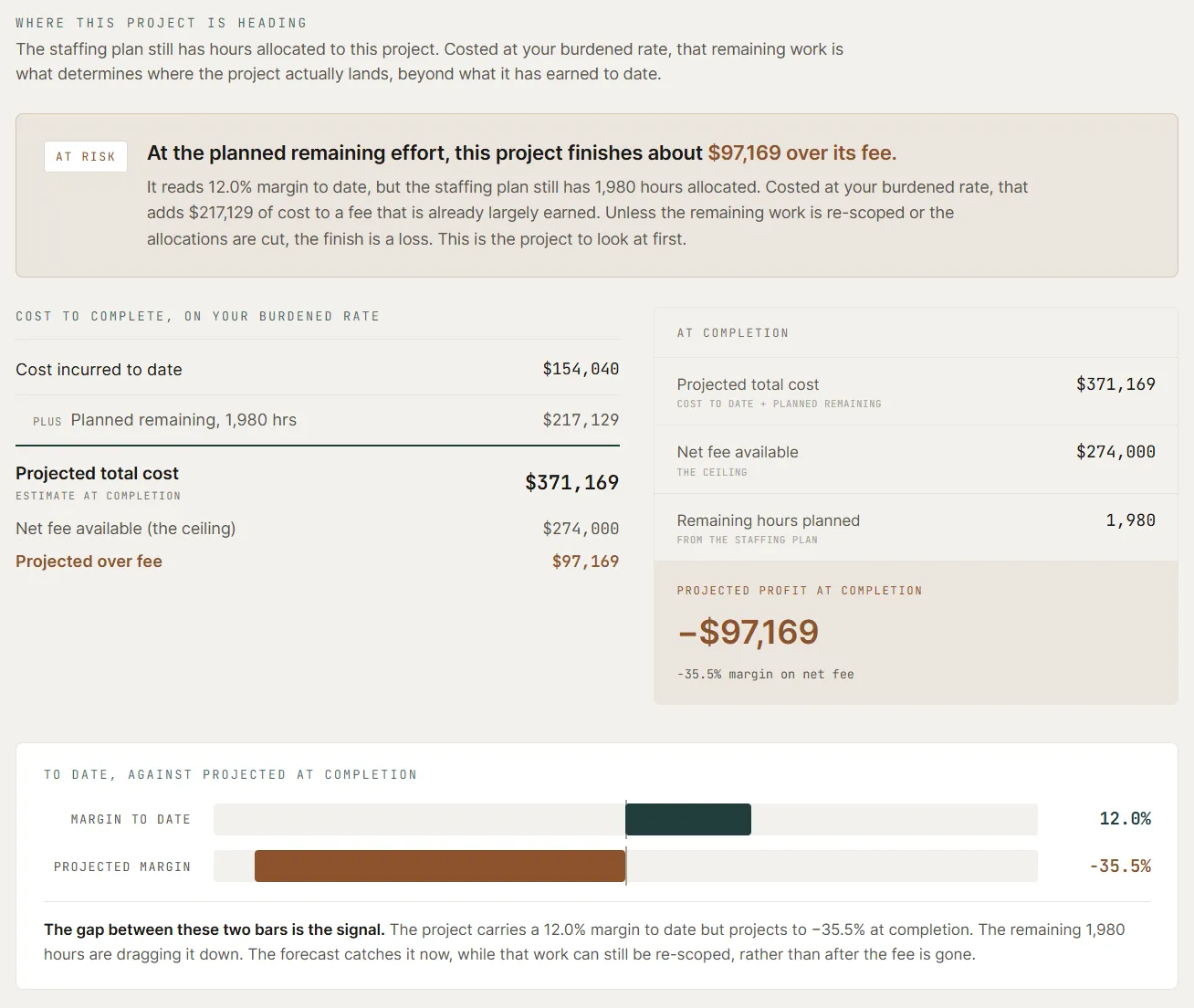
The at-completion projection: a project reading healthy to date, heading over its fee once the remaining staffing is costed.
05
Firm value
What is the firm worth?
For buy-ins, succession, and the conversations partners keep postponing. The engine reads the firm's own revenue, margin, backlog, and mix, and produces an indicative range as a memo: the methods, the assumptions, and the risk notes on the page.
What it weighs
-
Revenue quality
Recurring versus one-time work, client durability, concentration.
-
Margin structure
Normalized profitability, overhead burden, owner compensation context.
-
Backlog visibility
Committed work, pipeline timing, confidence in forward revenue.
-
Client concentration
Exposure to a small number of clients and the risk to future earnings.
-
Sector mix
How the firm’s sector spread affects risk and value.
-
Principal dependency
How much of the value walks out the door with specific people.
What it is
- Indicative valuation range
- Value-driver analysis
- Risk adjustments
- Assumption transparency
- A starting point for internal discussion
What it is not
- Certified valuation report
- Tax or legal advice
- Fairness opinion
- Formal appraisal for litigation, IRS, or transaction purposes
How the answers hold up
Every answer shows its work.
The reasoning is an engine you can inspect, not a model's guess. That is what decision intelligence means here, across every domain the system runs.
Deterministic engines
The numbers come from engines with fixed, inspectable methods: the same thresholds, the same formulas, the same inputs, the same answer. Open any verdict and the method is on the page.
The AI narrates. It never computes.
The model writes the reading; the engines produce every figure in it. A number the engine did not compute is rejected before it reaches you. The narrative is checked against the data it cites, and a narrative that fails the check is rewritten or refused.
Every figure drills down
A spend total opens to its transactions. A risk finding cites its clause. A budget line opens to the rows that summed into it. Nothing asks to be taken on faith.
Ask, and get evidence
Ask Norma answers in plain language, and every figure in the answer carries a citation to the record it came from. When it cannot cite, it says so instead of guessing.
Positioning
The missing layer between accounting and operating judgment.
-
Bookkeeper
- Records what happened.
-
Accountant
- Reports what happened.
-
Fractional CFO
- Advises, periodically.
-
Norma
- Answers the decision in front of the firm now.
Roadmap
The decision layer above the tools firms already use.
Norma is not being built to replace the systems design firms already rely on. Deltek, QuickBooks, Rippling, Airtable, spreadsheets, and project-management tools remain the systems of record. Norma sits above them, connects the data, and turns scattered firm information into operating judgment.
Founded recently, Norma is being built in phases around the real operating decisions architecture and design firms make every week. The items below are directional roadmap themes, not dated commitments or guaranteed feature lists.
-
Phase 01
Now
- QuickBooks Online, live: read-only over the book of record, with one sanctioned write, the invoice push a person confirms
- Airtable, connected: read-only weekly sync that rehearses before it applies
- Structured CSV intake from any system
- The five decision domains above: fees and pricing, contracts and scope, cash and collections, budget and operations, firm value
-
Phase 02
Next
- Deltek Ajera and Vantagepoint integrations
- Rippling integration
- Capacity, pursuit, and revenue-gap engines graduating from analysis to verdicts
-
Phase 03
Expanding
- Support for more design-firm types
- More scenario modeling for hiring, pricing, pipeline, cash, and scope
- Continuous monitoring of revenue, AR, margin, utilization, and concentration risk
- More configurable decision layers by firm type
-
Phase 04
Longer term
- Broader domestic adoption
- International support
- Optional anonymized benchmarking
- Market intelligence layer as the connected data network grows
Start here
See how the workspace thinks.
Start with one decision, one contract, or one firm valuation.